


Gallery - Photo, Video & Home
3.65.00 Reviews
App Specs
- Version
- 22.0
- Updated On
- License
- Free
- Downloads
- 500,000+
- Developer
- Thebes Ads PTE LTD
- Categories
- Photography
- Platform
- Android
Screenshots

 Analysis by AppCompare
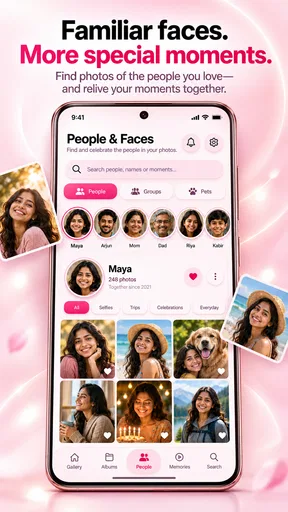
I often notice the need for a better gallery app at home, when someone asks to see a photo from last weekend and it is buried among screenshots, short clips, and pictures from months ago. Gallery - Photo, Video & Home is aimed at that everyday job: keeping personal media in order, revisiting memories, making edits, and viewing a gallery at home. I see its appeal less as a place to create elaborate projects and more as a practical stop between taking a picture and finding it again.
How it fits into a shared household
On a shared tablet or phone, a gallery can become a casual household reference: a child wants to revisit a holiday clip, or someone is looking for a picture of a recipe, a room, or a family gathering. The useful question is not only whether an app can display photos, but whether it helps people get back to the right moment without turning the library into another chore. Gallery’s focus on organising photos and videos makes that a sensible use case.
I would treat it as a viewing and organisation tool, rather than assume it is a shared family archive. A household may use one device together, but that does not automatically mean separate people have separate libraries or private spaces. If more than one person handles the device, I would decide whose media belongs there and how it will be sorted before making it the default place for everyone’s pictures.
One practical habit is to use a shared device for media that the household actually wants to browse together, while keeping personal images on individual devices. That boundary avoids the familiar problem of a communal gallery accumulating unrelated screenshots and private pictures. It also makes the app easier to use: a smaller, intentional collection is quicker to browse than a camera roll that serves several people and every purpose.
Make the library easier to live with
Organisation is most valuable when it prevents repeated searching. I would start by deciding what kinds of images are worth keeping easy to find: trips, home projects, school events, or short videos people routinely ask to see. Even without relying on any particular automatic sorting behaviour, a consistent approach to what goes into the library can make later browsing less frustrating.
A useful, slightly less obvious workflow is to think of the gallery as a record of things you may need to refer back to, not just special occasions. Photos of a furniture layout, a plant label, a repair before and after, or a document you need to discuss can be useful for a while and then become clutter. Reviewing those practical pictures periodically helps preserve the memories without letting temporary reference shots take over.
For shared viewing, I would also avoid handing over the device while it is open among unrelated personal images. Find the intended album or moment first, then pass the screen over. That small bit of preparation matters more in a household setting than a feature checklist: it keeps the interaction comfortable and reduces accidental browsing through someone else’s camera roll.
Worth Reading Before You Choose

Baby Panda World Brings Quick Play to Modern Phones, but Its Game Library Feels Busy

ESPN’s Live Game View Makes Following Close Games Easier

QuizzLand Review: A Good Fit for Short Trivia Breaks, Not Every Player

Basketball Stars: Multiplayer Is Fast, but Can It Recover When Matches Go Wrong?

WEBTOON Turns Phone Updates Into a Better Reading Routine

Link to Windows Runs on Shared Habits, Not Social Feeds
Editing without losing the original purpose
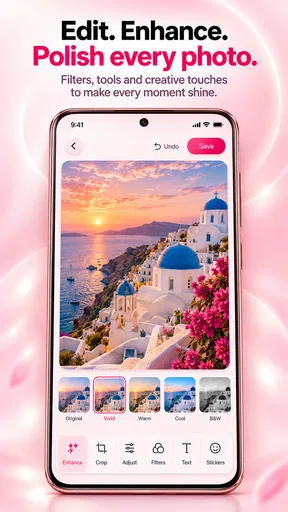
The app includes media editing, which is handy when a picture needs a modest adjustment before it is shown or kept. I would use that capability for quick fixes rather than expect a dedicated creative suite. If I want to make a polished collage, apply a precise sequence of effects, or control detailed export settings, a specialist photo editor is likely the better fit.
My practical advice is to edit a copy when the original image matters, especially for family photos or records of a home project. That keeps the untouched version available if a crop or adjustment does not work out. It is a simple safeguard, not a claim about how this app handles originals: the important point is to be deliberate whenever an image has value beyond its appearance.
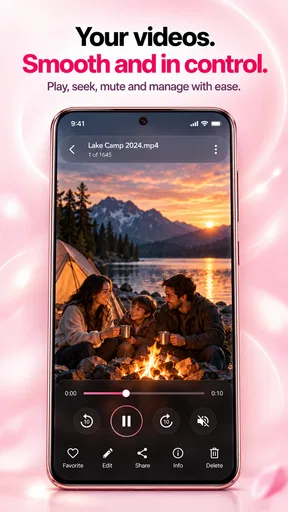
Video is part of the same everyday library, so a household can use the app to revisit short clips alongside still pictures. That is convenient when the goal is to remember a moment, but it is not a substitute for a purpose-built video editor. I would keep the distinction clear: use Gallery to organise and look back, and switch tools when a clip needs more involved cutting or production.
Set boundaries before sharing a device
Gallery at Home gives the app a household angle, but I would not read that phrase as a promise of account separation, parental controls, or private family profiles. Those are different needs, and they should be checked independently before choosing any gallery for a shared device. If every person needs a clearly separate media space, a device or service designed around individual accounts may be a safer match.
For a device used by adults and children, decide what is appropriate to leave accessible and whether the device itself has a suitable lock or user setup. The app’s age classification is Everyone, which makes it broadly suitable in the store’s content-rating sense; it does not remove the need for ordinary supervision or device-level privacy decisions. I would be especially careful if a child can browse a phone that contains personal images from several people.
There is also a difference between coordinating around photos and coordinating access to them. A household might agree that one person adds trip pictures or that a tablet is used for living-room viewing, but the app should not be assumed to provide a shared upload workflow or permission controls. If the family’s main requirement is collaborative albums with carefully managed access, compare dedicated photo-sharing services before settling on a general gallery.
What to expect from the app
This is a free photography app from Thebes Ads PTE LTD, with in-app purchases listed at $9.99 per item. I would explore the everyday library and editing workflow before spending anything, and check the purchase details at the point of use so the cost is clear. Its current version is 22.0, and the stated minimum operating-system requirement is 7.0, which makes compatibility worth checking against the device you plan to use.
The audience figures suggest it has found a meaningful user base: Gallery has over 500,000 installs and a 3.6 average from 685 ratings. I take that as a reason to approach it with balanced expectations, not as proof that it will suit every phone or household. The review count is small compared with the rating count, so I would pay more attention to trying the actual browsing and editing experience on my own device than to treating brief public feedback as a complete picture.
Compared with the gallery already built into a phone, a separate app needs to earn its place. The built-in option is often the easiest choice if all you need is quick access to recent pictures and familiar device integration. Gallery is more compelling if its combination of organisation, editing, and a home-viewing emphasis matches how you use media. Against cloud photo services, the trade-off is different: those are often better for backup and cross-device access, while a gallery app is the more direct fit when the immediate task is browsing media on the device.
Who should choose it—and who should look elsewhere
I would recommend trying Gallery - Photo, Video & Home if you want a straightforward place to revisit pictures and clips, make everyday edits, and use a gallery in a home setting. It makes particular sense for someone who shares selected memories on a household device but does not need a complex publishing or editing workflow. The app is free to start, and its Everyone content rating makes it broadly approachable, though device privacy still depends on the household’s own setup.
I would skip it if your priority is robust cloud backup, tightly controlled sharing between individual accounts, or advanced photo and video production. Those needs call for tools built specifically around backup, collaboration, privacy, or creative control. I would also avoid making it the only family media solution until you have decided how different people’s photos should remain separate and tested whether the browsing experience feels comfortable on the device you will share.
A practical household verdict
For me, the strongest case for Gallery - Photo, Video & Home is modest and useful: it brings photos, videos, editing, and at-home viewing into one place without asking the household to treat a gallery as a complete cloud or family-account system. That makes it worth a look when the everyday problem is finding and enjoying media on a device, rather than managing a large, carefully permissioned archive.
I would begin with a small, low-risk test: open a few representative photos and videos, try the edits you actually use, and see whether the library is easy to navigate on your device. Then decide whether it belongs on a shared screen or should remain personal. That approach gives you a realistic answer quickly. If it makes familiar memories easier to find, it has a clear role; if household boundaries or deep creative tools matter more, a more specialised alternative will serve you better.
Pros
- Browse photos and videos together in one convenient library.
- Create albums to organize personal pictures and clips.
- Built-in photo tools let you make quick edits without another app.
- A familiar gallery layout makes media easy to scan and find.
- Useful for viewing locally stored media without relying on a social feed.
Cons
- Some features may require access to broad photo and video permissions.
- Editing options may be limited compared with dedicated photo editors.
- Large libraries can take time to load or sort on older devices.
- Ads or in-app prompts may interrupt browsing
- depending on the version.
- Deleted items may not be recoverable unless your device backs them up.
FAQs for Gallery - Photo, Video & Home
What is Gallery - Photo, Video & Home?
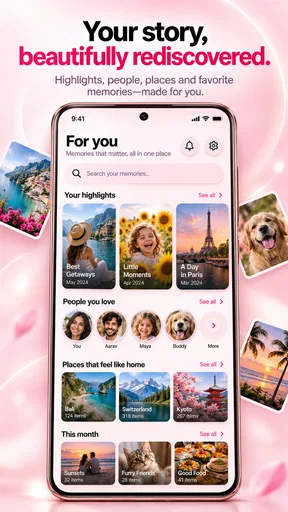
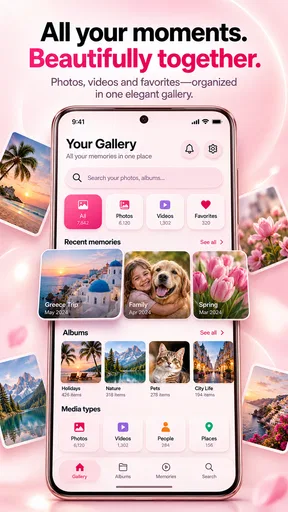
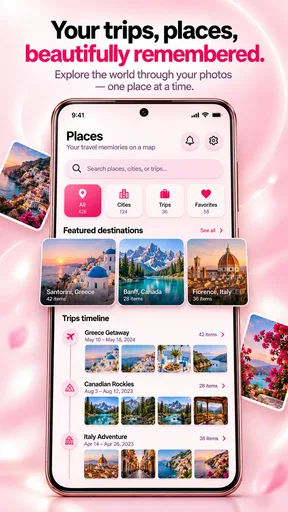
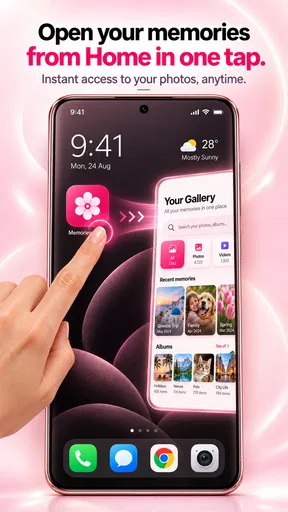
Gallery - Photo, Video & Home is a media-gallery app designed to help you browse and manage photos and videos stored on your device. Depending on the version and device, it may also include a home screen for finding albums, recent items, or media categories. Check the app’s listing and screenshots to confirm which features are available in the version you plan to install.
Does Gallery - Photo, Video & Home work offline?
A gallery app can generally display media already saved on your device without an internet connection, so basic browsing may be available offline. However, features that depend on online services—such as cloud backup, sharing integrations, or downloading content—may require internet access. Exact behavior can vary by release, so review the app description and test its main functions after installation.
What permissions does the app need, and why?
To show your photos and videos, Gallery - Photo, Video & Home needs access to media files on your device. Depending on its features and your operating-system version, it may request permission to select or manage media, create files, or share items. Grant only the access you are comfortable with, and use your phone’s privacy settings to review or change permissions later.
Can I use Gallery - Photo, Video & Home to edit or protect my photos?
Gallery apps sometimes offer tools such as cropping, rotating, organizing albums, hiding items, or setting private folders, but the available options depend on the specific version of Gallery - Photo, Video & Home. Do not assume that a feature is included simply because similar apps offer it. Check the current store listing and in-app menus, and keep a separate backup before making changes to important media.
Is Gallery - Photo, Video & Home safe to download, and what should I check first?
Download Gallery - Photo, Video & Home from an official app store or another trusted source, and verify the developer name, recent updates, ratings, and privacy information. Read the requested permissions before granting access to your media. Availability, compatibility, advertisements, and optional purchases can differ by platform and version, so review the details shown on the listing for your device before installing.


